
How to Build AI Agent Using N8n
Artificial intelligence is changing the way businesses manage everyday tasks. From answering customer questions to organizing information and automating repetitive processes, AI can now support many activities that traditionally require manual effort. One of the most practical ways to combine artificial intelligence with automation is to create an AI agent using n8n.
If you are searching forHow to Build AI Agent Using N8n, you may think the process requires advanced programming knowledge. Fortunately, n8n provides a visual workflow system that makes it easier to connect AI models with applications, APIs, databases, websites, and other services.
In this guide, we will explain the process in simple steps and explore how businesses can use AI agents to save time and improve productivity.
In this guide, we will explain the process in simple steps and explore how businesses can use AI agents to save time and improve productivity.

What Is an AI Agent?
An AI agent is a software system that can understand a request, process information, make decisions, use available tools, and complete a particular task.
A traditional chatbot generally responds to questions. An AI agent can go further by interacting with other systems and performing actions.
For example, imagine that a customer asks, “Can you check my order status?” An AI agent can understand the request, access a connected database, find the relevant order information, and provide an answer.
AI agents can therefore be useful for customer support, lead generation, research, email management, appointment scheduling, content workflows, and many other business activities.
What Is n8n?
n8n is a workflow automation platform that allows users to connect different applications and services. Instead of manually moving information from one platform to another, you can create a workflow that performs those actions automatically.
n8n uses nodes to represent individual steps. One node can receive information, another can process it with an AI model, and another can send the result to a spreadsheet, database, email service, or another application.
This visual approach makes automation easier to understand, especially for beginners.
Why Build an AI Agent With n8n?
There are several advantages to combining AI with n8n. AI provides the ability to understand and process information, while n8n connects that intelligence to other applications and actions.
For example, a digital marketing agency can create an AI agent that receives a website lead, identifies the customer’s requirements, categorizes the lead, saves the information, and notifies the sales team.
The workflow can be customized according to the needs of the business. You can begin with a simple process and gradually add more tools and features.
How to Build AI Agent Using N8n Step by Step
The first stage of How to Build AI Agent Using N8n is to decide what you want your agent to accomplish.
Do not begin by creating a complicated workflow. Instead, choose one specific problem.
For example, you could create an agent that:
- Answers customer questions
- Qualifies website leads
- Summarizes information
- Organizes emails
- Searches business data
- Helps schedule appointments
- Supports content research
Once you have a clear objective, you can start building your workflow.
Step 1: Create a New n8n Workflow
Log in to your n8n environment and create a new workflow. Give the workflow a clear name based on its purpose.
For example, if you are creating a customer support system, you could name it “Customer Support AI Agent.”
A clear workflow name becomes especially helpful when you create several automations for different business processes.
Step 2: Add a Trigger
Every n8n workflow needs a starting point. This is known as a trigger.
You can use different types of triggers depending on your project. A webhook is useful when another application or website needs to send information to your workflow.
For example, a visitor submits a website form asking:
“Which digital marketing services do you offer?”
The trigger receives the information and passes it to the next node.
Step 3: Connect an AI Model
The next important step inHow to Build AI Agent Using N8n is connecting an AI model.
The AI model acts as the reasoning component of your agent. It processes the user’s message and determines what type of response or action is required.
You should provide clear instructions to the AI. For example:
“You are a friendly customer support assistant. Answer questions about our services clearly and professionally. If the required information is unavailable, do not make up an answer.”
Clear instructions can help make the agent’s responses more consistent.
Step 4: Add Tools to Your AI Agent
An AI agent becomes much more useful when it can access external tools.
Depending on your requirements, you can connect your agent to spreadsheets, databases, APIs, email platforms, calendars, CRM systems, or other applications.
For example, if a customer asks about an existing project, the agent can retrieve information from a connected database instead of guessing.
This allows the AI to work with real information and perform useful tasks.
Step 5: Add Memory
Memory allows an AI agent to maintain context between interactions.
Imagine a customer first says, “I am interested in SEO.” Later, the customer asks, “How much does it cost?”
With suitable memory, the agent can understand that the second question relates to SEO services.
Memory can improve conversations, but it should be implemented carefully. Only store information that is necessary and appropriate for your application.
Step 6: Create Automated Actions
The next stage of How to Build AI Agent Using N8n is connecting the agent to actions.
After the AI processes the request, n8n can perform an action automatically. For example, it can send an email, update a spreadsheet, create a CRM entry, notify a team member, or return a response to the user.
This is what makes an AI agent different from a simple text-generation tool. The agent can participate in a complete workflow.
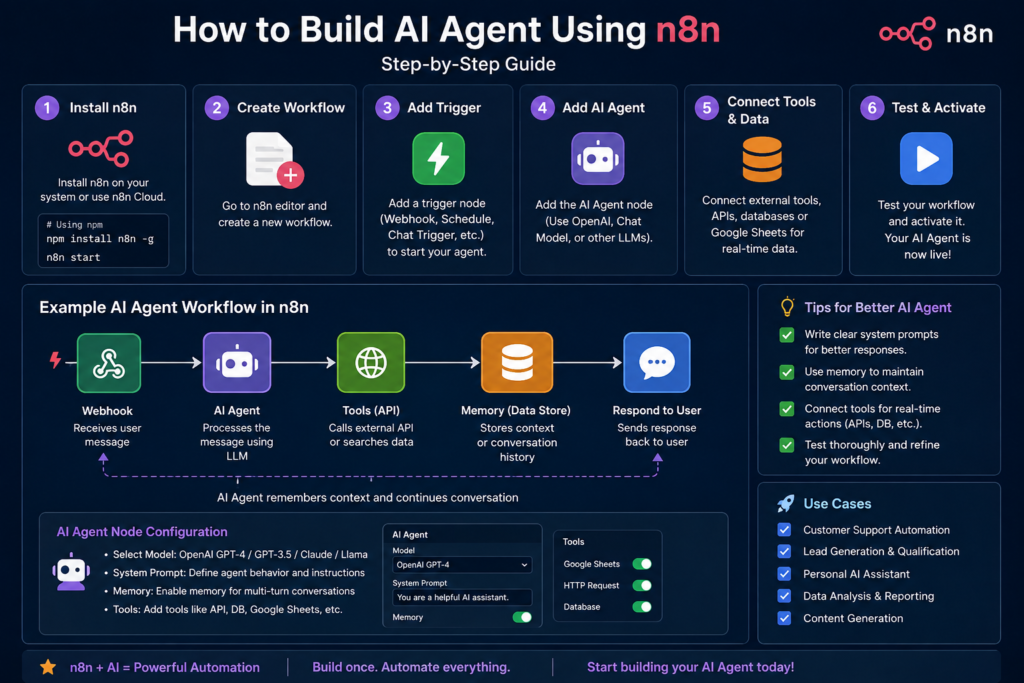
How to Test Your AI Agent
Testing is an essential part of How to Build AI Agent Using N8n.
Before allowing real customers to use your agent, test it with different types of questions. Try normal requests, unclear questions, incomplete information, unexpected questions, and requests outside the agent’s purpose.
You should also check what happens if an external service is unavailable.
Testing helps you identify problems before they affect real users. If the agent provides an incorrect or confusing response, improve its instructions or modify the workflow.
Common Mistakes to Avoid
One of the most common mistakes is building an overly complicated workflow at the beginning. Start with a simple objective and add features gradually.
Another mistake is providing vague instructions to the AI model. Clearly explain the agent’s role, responsibilities, limitations, and preferred communication style.
It is also important to use appropriate safeguards. If an agent can perform an important or sensitive action, consider adding a verification or human approval step.
Finally, monitor your workflow regularly. APIs, applications, credentials, and AI services can change over time.
Practical Example for a Digital Marketing Agency
Consider adigital marketing agency that receives leads through its website.
A visitor enters their name, email address, business type, and marketing requirements into a contact form. The information is sent to n8n.
The AI agent analyzes the information and identifies whether the visitor is interested in SEO, Google Ads, social media marketing, web development, or another service.
n8n can then save the lead information in a spreadsheet or CRM and send a notification to the sales team.
This process can reduce repetitive work and help the business respond to potential customers more quickly.
How to Improve Your AI Agent
Once you understandHow to Build AI Agent Using N8n, do not stop after creating the first working version.
Review the workflow regularly and look for opportunities to improve it. You may discover that customers ask questions that were not included in the original instructions. You can update the AI’s instructions and add relevant information.
You can also add new tools, improve error handling, introduce approval steps, or connect additional applications.
The goal is not to create the most complicated AI agent. The goal is to create an agent that solves a real problem reliably.
Final Thoughts
LearningHow to Build AI Agent Using N8n can be a valuable skill for anyone interested in artificial intelligence, automation, and digital business.
The process begins with a clear objective. Then, you create a trigger, connect an AI model, provide useful tools, add memory when required, and configure automated actions.
The combination of AI and n8n allows you to build workflows that can understand information and take practical actions. Whether you are creating a customer support assistant, lead qualification system, research assistant, or business automation, starting small is the best approach.
Test your workflow carefully, improve it based on real results, and gradually add new capabilities. With the right planning, n8n can turn an AI idea into a useful automation system that saves time and makes business processes more efficient.